Session Notes
Export Session Notes
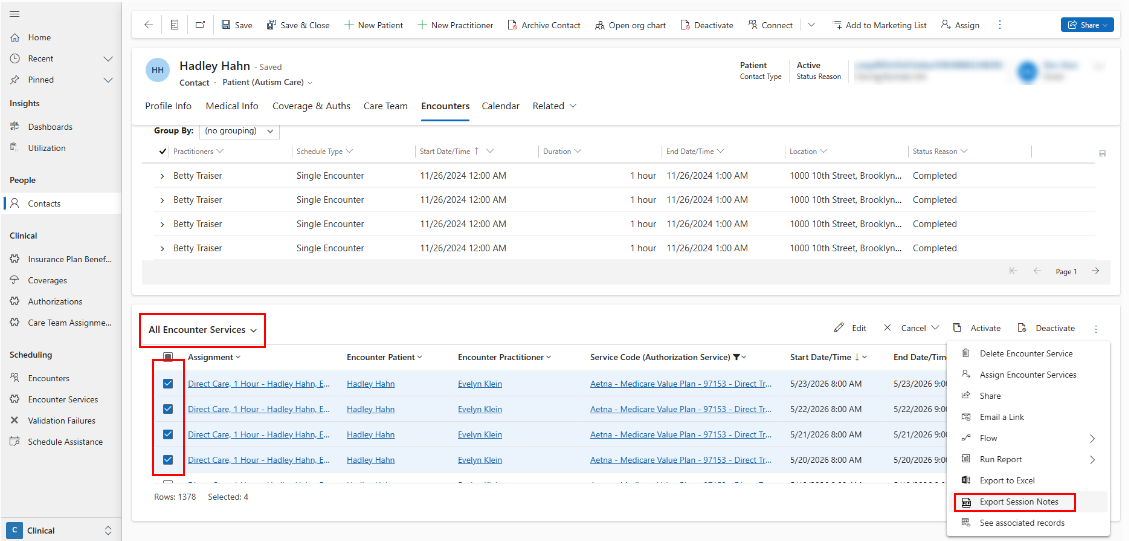
Patient session notes can be exported from any Encounter Service view:
- The encounter services main view on the site menu.
- The encounter services subgrid on the Encounters tab of a contact.
- The encounter service form for any single encounter service.
Filter the view to the services, patient, date range, and session status (e.g. only submitted sessions) you'd like to export session notes for. Then, click 'Export Session Notes'.
A session note export can only be created for one patient's sessions at a time. Separate exports can be generated for more than one patient's sessions.
Session Note Content
Header: Organization logo (based on the logo uploaded to the patient's business unit)
Footer: page number, patient name, patient DOB, member ID from primary coverage
Session details:
- Patient full name
- Patient DOB
- Patient diagnosis
- Date of service rendered
- Time in / Time out
- Session Duration
- Units utilized (based on charge item)
- Place of service (location name and address of encounter location)
- Conducted over Telecare (when telecare is indicated on the encounter service)
- Service rendered (procedure code and service name)
- Rendering Provider (practitioner on encounter service), and their Qualifications that are configured to show on session notes.
- Supervising BCBA / NPI number (rendering provider on the claim, or the rendering provider assignment on the authorization when the claim has not been generated yet), and their Qualifications that are configured to show on session notes.
- Other individuals present (name of practitioner from overlapping encounter, and their Qualifications that are configured to show on session notes.)
Notes: the session Narrative completed in the Note app.
Primary Targets addressed in this session (for direct treatment sessions)
Area Subdomain Goal Target Correct/Total Trials Score Problem Behaviors / Barriers to Treatment Plan Implementation (for direct treatment sessions)
Behavior Category Behavior Behavior Objective Count Rendering Provider Name, and their Qualifications that are configured to show on session notes.
Electronically Signed By / Date Signed (for submitted sessions)
97153 Narrative
The following narrative template shows on any services where the healthcare service type is Direct Treatment or Direct Treatment by BCBA.
A list of participants
- The system will automatically add the behavior technician and patient.
- Users can add BCBA or any additional participants
A count of skill acquisition targets addressed.
A list of intervention techniques used as selected by the behavior technician. The behavior technician is prompted with a list of evidence based intervention techniques that were configured by the BCBA for the targets addressed. (All techniques in the list are selected by default.)
A count of problem behaviors that posed as barriers to treatment during the session.
Text added within 2 free‑text fields
- Setting Events - disruptions or barriers that affected the learner's engagement in the session.
- Preferences and Reinforcers that were effective in keeping the learner engaged.
The auto-generated narrative may be modified by the practitioner to best summarize the session.
97155 Narrative
The following narrative template shows on any services where the healthcare service type is Adaptive Behavior Treatment with Protocol Modification or Direction of Technician.
A list of participants
- The system will automatically add the practitioner.
- Users can add patient, BCBA, or any additional participants
A session summary - based on the activities the user checks off from the following list, and any additional activities they add:
- Created targets in patient's care plan - user can select from a list of targets created that day, or add custom text.
- Created behaviors in patient's care plan - user can select from a list of behaviors created that day, or add custom text.
- Analyzed data in patient's care plan
- Made updates to patient's care plan - user can select from a list of phase changes and condition changes for that day, or add custom text.
- Evaluated patient's current progress - user can add custom text describe analysis and insights.
- Other
- Observed and supported patient directly -
- Probed skills - user can describe skills that were probed.
- Observed and supported skill acquisition - user cab select from a list of data points added during the timing of the session, or add custom text.
- Observed and supported behavior reduction - user cab select from a list of data points added during the timing of the session, or add custom text.
- Other
- Trained behavior technician:
- Modeled intervention techniques - user can add detail.
- Retrained data collection procedures - user can add detail.
- Reviewed instructions and interventions - user can add detail.
- Provided reinforcing and constructive feedback - user can add detail.
- Other
- Evaluated behavior technician documentation
- Session Notes
- Data Collection
- Graphs
- Other
Barriers to treatment that were identified if the user selects to add barriers.
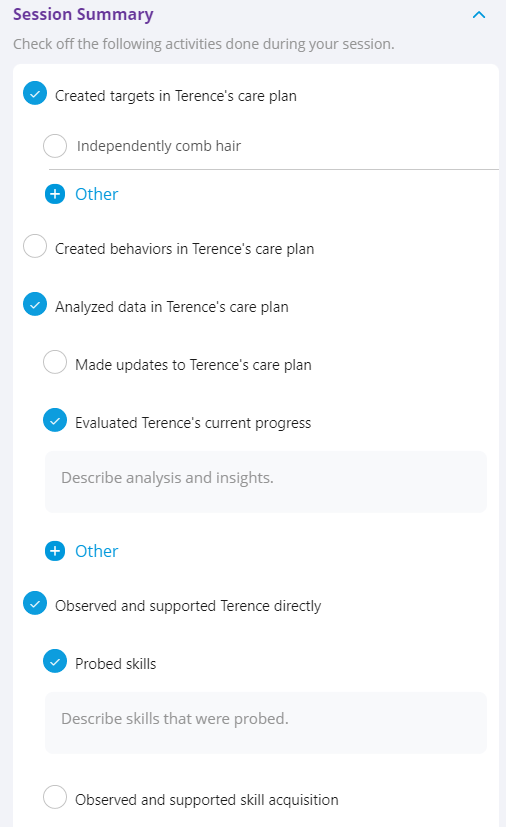
The auto-generated narrative may be modified by the practitioner to best summarize the session.
Best Practice: Users should add detail including the specific targets that were addressed in the free-text boxes that open within each activity.
97156 Narrative
This narrative template shows on any services where the healthcare service type is Family Training.
A list of participants
- The system will automatically add the BCBA and the parent.
- Users can add patient or any additional participants
A session summary - based on the activities the user checks off from the following list, and any additional activities they add:
- Trained patient's stakeholder:
- Modeled intervention techniques - user can add detail.
- Retrained data collection procedures - user can add detail.
- Reviewed instructions and interventions - user can add detail.
- Provided reinforcing and constructive feedback - user can add detail.
- Other
- Reviewed targets in patient's care plan - user can add custom text.
- Reviewed behavior intervention plans - user can add custom text.
- Trained patient's stakeholder:
Barriers to treatment that were identified if the user selects to add barriers.
Best Practice: Users should add detail including the specific targets that were addressed in the free-text boxes that open within each activity.
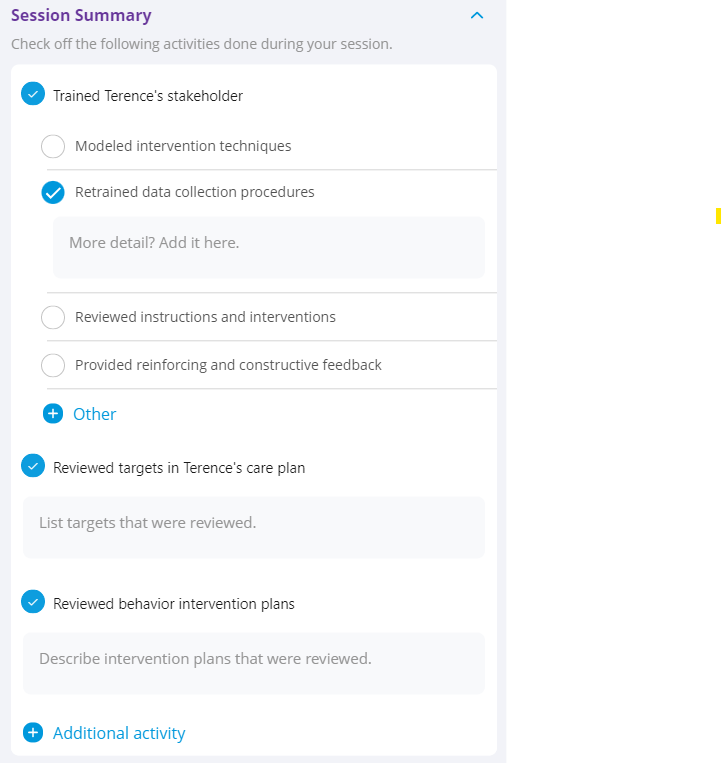
The auto-generated narrative may be modified by the practitioner to best summarize the session.