Leads
Leads are potential patients or practitioners captured from automated sources like website forms or ad responses. They help manage large volumes of inquiries before qualification. Unlike opportunities, which track confirmed cases moving toward onboarding, Leads are for early-stage interest.
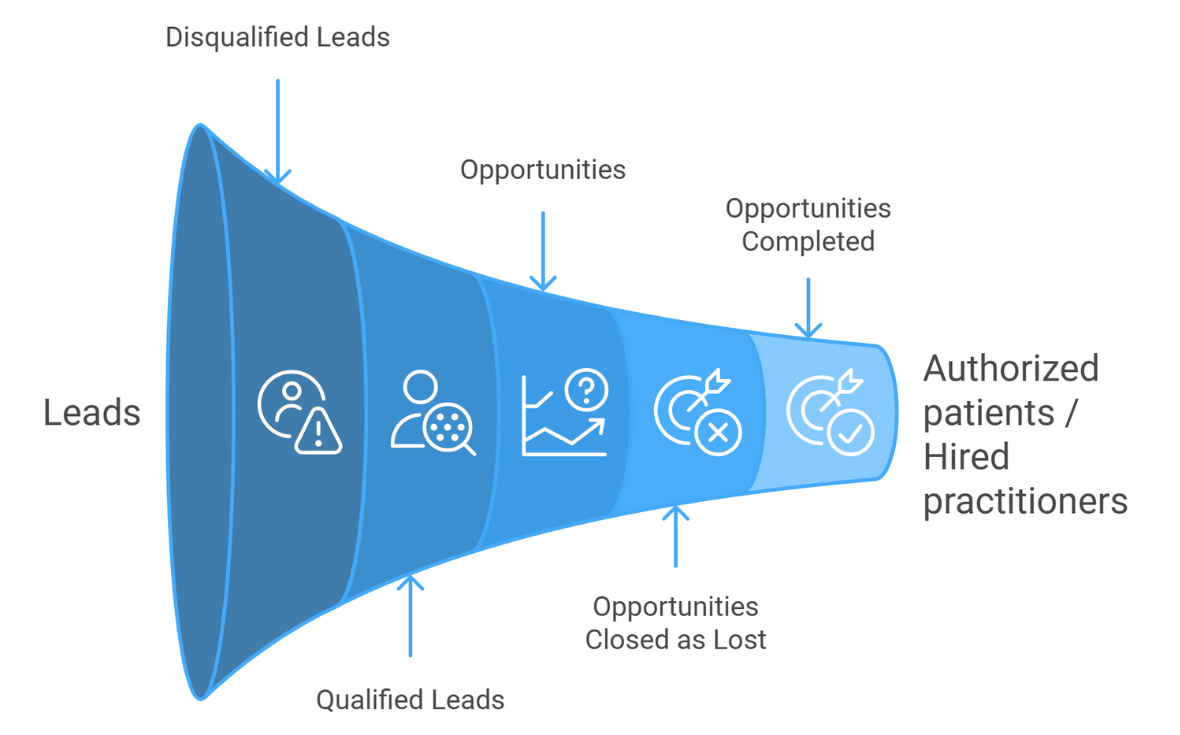
How to set your forms to create leads in CRM:
Overview
The Create Lead API allows you to create Patient or Practitioner leads in the Autism Care CRM when a parent or practitioner submits a form from your website, ad, or intake flow. There are two supported versions:
- API 1.0 (GET) – Create leads without attachments
- API 2.0 (POST) – Create leads with optional file attachments (resume, insurance card, etc.) Both versions create the same Lead record in CRM.
Authentication
All requests require an API key.
- The API key must be passed as a query parameter
- Either of the following parameter names is accepted, case-insensitive:
- SubscriptionKey
- Key
To obtain an API key, please contact your Chorus account manager.
Endpoint
https://api.chorus.cloud/lead/create
Supported Methods
| Method | Purpose |
|---|---|
| GET | Create a Lead (no attachments) |
| POST | Create a Lead with optional attachments |
API 1.0 – Create Lead (No Attachments)
Method
GET
Request Parameters
All parameters are passed as query parameters in the request URL.
| Name | Type | Description |
|---|---|---|
| subscriptionkey | string | API key provided by Chorus |
| leadtype | string | Type of lead to create. Must be "Patient" or "Practitioner"(case-insensitive) |
| firstName | string | First name of the patient or practitioner |
| lastName | string | Last name of the patient or practitioner |
| string | Primary contact email address, or practitioner email address | |
| primaryContactFirstName | string | Primary contact first name |
| primaryContactLastName | string | Primary contact last name |
| phone | string | Primary contact phone number |
| cellPhone | string | Practitioner phone number |
| addressState | string | State or Province |
| message | string | Description or message submitted from the form |
| hasDiagnosis | boolean | 'true' or 'false' - Indicates whether the patient already has an Autism diagnosis |
| insurance | string | Patient insurance |
| marketingSourceId | string (GUID) | ID of the marketing source you'd like listed on the lead (the ID is found in the URL of the marketing source definition) |
| businessUnitId | string (GUID) | ID of the business unit you'd like listed on the lead (the ID is found in the URL of the business unit) |
Example Request
    https://api.chorus.cloud/lead/create
    ?subscriptionkey=YOUR_API_KEY
    &leadtype=Patient
    &firstName=Jane
    &lastName=Doe
    &primaryContactFirstName=John
    &primaryContactLastName=Doe
    &email=jane.doe@example.com
    &phone=5551234567
    &addressState=CA
    &message=Looking%20for%20ABA%20therapy
    &hasDiagnosis=true
    &insurance=Aetna
    &businessUnitId=3f2c1a14-2d9b-ee11-bdf4-00224805c0bb
    &marketingSourceId=a6ff93a4-f7fe-ed11-8f6e-00224805c0bb
Form Integration Example
You can configure your website form to submit directly to the API endpoint.
    <form action="https://api.chorus.cloud/lead/create" method="get">
    <input type="hidden" name="subscriptionkey" value="YOUR_API_KEY" />
    <input type="hidden" name="leadtype" value="Patient" />

    <input name="firstName" placeholder="First Name" />
    <input name="lastName" placeholder="Last Name" />
    <input name="primaryContactFirstName" placeholder="Primary Contact First Name" />
    <input name="primaryContactLastName" placeholder="Primary Contact Last Name" />
    <input name="email" placeholder="Email" />
    <input name="phone" placeholder="Phone" />
    <input name="addressState" placeholder="State" />
    <input name="insurance" placeholder="Insurance" />

    <input type="hidden" name="businessUnitId"
            value="3f2c1a14-2d9b-ee11-bdf4-00224805c0bb" />

    <button type="submit">Submit</button>
    </form>
API 2.0 – Create Lead WITH Attachments
Method
POST
Request Parameters
- All lead fields are sent as form fields
- Files are sent as multipart/form-data
- Query parameters are not read (except authentication)
- Required form encoding: multipart/form-data
| Name | Type | Description |
|---|---|---|
| subscriptionkey | string | API key provided by Chorus |
| leadtype | string | Type of lead to create. Must be "Patient" or "Practitioner" (case-insensitive) |
| firstName | string | First name of the patient or practitioner |
| lastName | string | Last name of the patient or practitioner |
| string | Primary contact email address, or practitioner email address | |
| primaryContactFirstName | string | Primary contact first name |
| primaryContactLastName | string | Primary contact last name |
| phone | string | Primary contact phone number |
| cellPhone | string | Practitioner phone number |
| addressState | string | State or Province |
| message | string | Description or message submitted from the form |
| hasDiagnosis | boolean | 'true' or 'false' - Indicates whether the patient already has an Autism diagnosis |
| insurance | string | Patient insurance |
| marketingSourceId | string (GUID) | ID of the marketing source you'd like listed on the lead (the ID is found in the URL of the marketing source definition) |
| businessUnitId | string (GUID) | ID of the business unit you'd like listed on the lead (the ID is found in the URL of the business unit) |
| file | file | Attach one or more files (repeatable) |
Attachments
- Files are stored in CRM as notes on the Lead timeline
- Any file type is accepted (subject to CRM size limits)
- Multiple files are supported by repeating the file field
Form Integration Example
You can configure your website form to submit directly to the API endpoint.
    <form action="https://api.chorus.cloud/lead/create"
        method="post"
        enctype="multipart/form-data">

    <input type="hidden" name="subscriptionkey" value="YOUR_API_KEY" />
    <input type="hidden" name="leadtype" value="Patient" />

    <input name="firstName" placeholder="First Name" />
    <input name="lastName" placeholder="Last Name" />
    <input name="primaryContactFirstName" placeholder="Primary Contact First Name" />
    <input name="primaryContactLastName" placeholder="Primary Contact Last Name" />
    <input name="email" placeholder="Email" />
    <input name="phone" placeholder="Phone" />
    <input name="addressState" placeholder="State" />
    <input name="insurance" placeholder="Insurance" />

    <input type="hidden" name="businessUnitId"
            value="3f2c1a14-2d9b-ee11-bdf4-00224805c0bb" />

    <label>Upload documents:</label>
    <input type="file" name="file" multiple />

    <button type="submit">Submit</button>
    </form>
Patient Leads
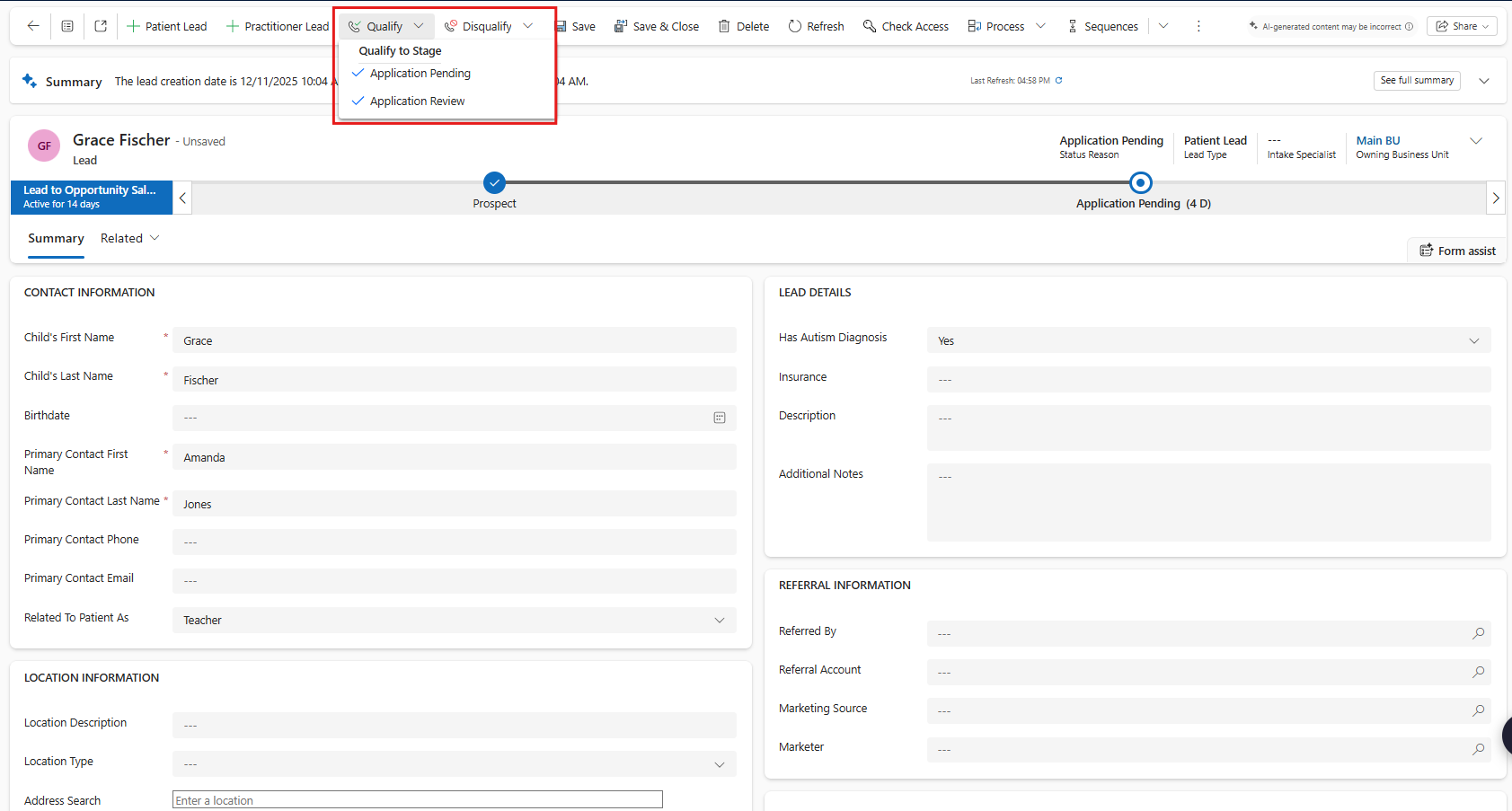
After patient leads are created from your website forms or ad responses, you can open the lead to fill out additional information about the patient as you obtain that information:

- Header -
- Intake Specialist - select the team member who is responsible for following up with this lead.
- Owning Business Unit - select the business unit within your organization that this patient will be part of.
- Contact Information -
- Child's First Name
- Child's Last Name
- Birthdate
- Primary Contact First Name
- Primary Contact Last name
- Primary Contact Phone
- Primary Contact Email
- Related To Patient As - select how the related contact entered above is related to the patient.
- Location Information - this can be added at the lead stage, or later once the lead has been qualified to an opportunity.
- Location Description - give the location a clear name for easy reference (e.g., Steven's summer home). This is how the location will display in Note if the patient gets services at this address.
- Location Type - this is how the place of service will be set on claims if the patient gets services at this address. Learn more about locations.
- Address Type - If the Location Type is 'Home,' the address type must be specified as 'Billing Address', 'Service Address' or both. A Patient can only have 1 address as their 'Billing Address' at any time.
- Address Search- search for the patient's address to populate the address fields
- Lead Details - the fields in this section can come automatically from website form-fills or ad responses and will help you choose which leads to take next steps with and which to disqualify.
- Has Autism Diagnosis
- Insurance
- Description
- Additional Notes
- Referral Information
- Referred By - select the individual at the account who referred this patient.
- Referral Account - select the account who referred this patient (e.g. care management association, physician's practice, etc.). Learn how to set up referral accounts.
- Marketing Source - select the source this lead was generated from (your website form fill, a facebook ad campaign, etc.). Learn how to set up marketing sources.
- Marketer - select the individual at your organization responsible for bringing in this lead.
- Timeline - You can initiate emails, phone calls, and tasks directly from the timeline. Click the ‘+’ button to add an entry to the timeline.
Patient Lead Workflow
Patient Leads have 2 stages:
- Prospect
- Application Pending
A patient lead is created at the Prospect stage.
Once an application has been sent to the parent to complete, enter the Application Sent Date and click 'Next Stage' to move the lead to the Application Pending stage.
You can either qualify the lead into an opportunity once you have sent the parent the application (qualify to Application Pending), or once you have received the application (qualify to Application Review). All information from the lead will be copied into the opportunity.
Disqualify the lead if the patient is not proceeding or not qualified for services, and choose why they were disqualified.
Practitioner Leads
After practitioner leads are created from your website forms or ad responses, you can open the lead to fill out additional information about the practitioner as you obtain that information:
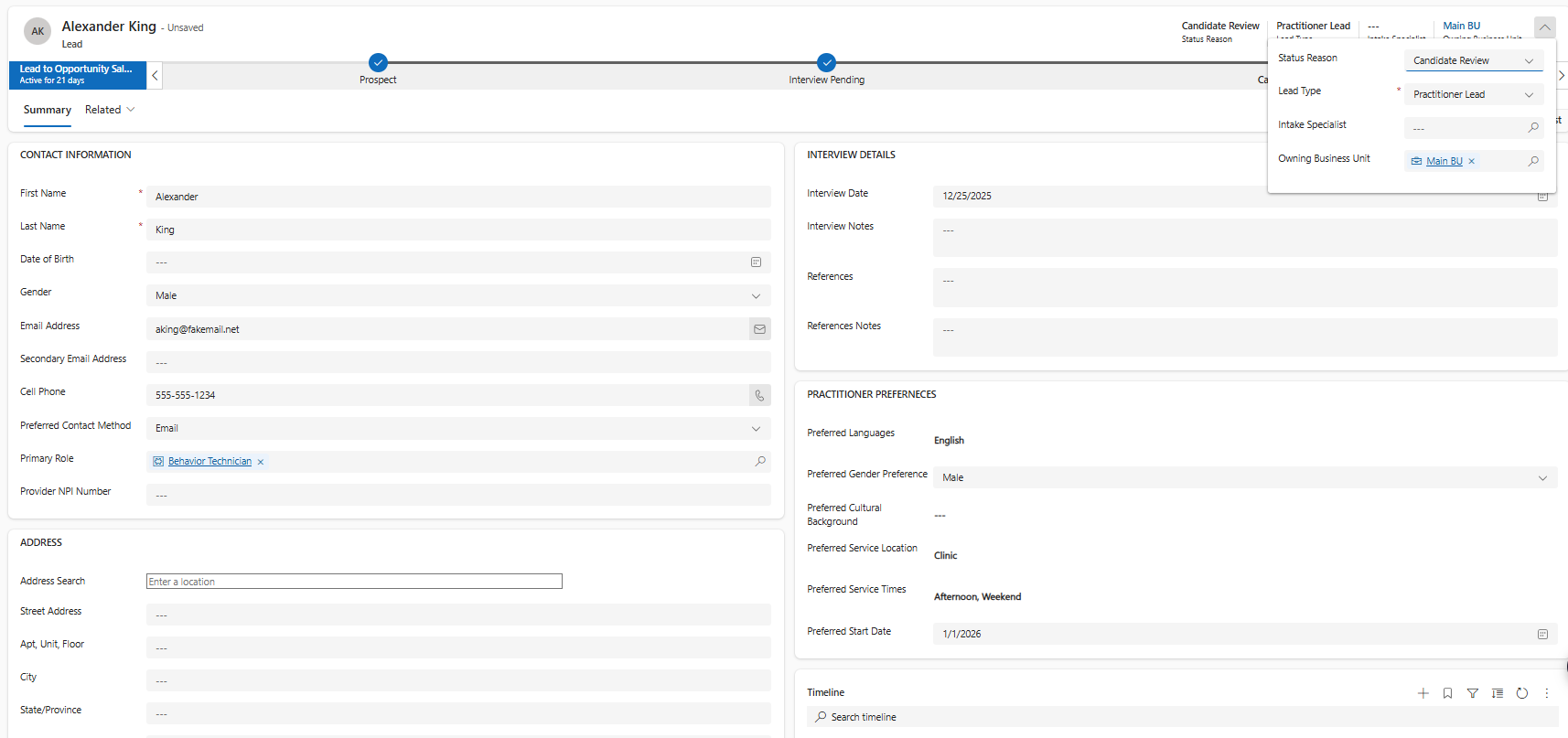
Header -
- Intake Specialist - select the team member who is responsible for following up with this lead.
- Owning Business Unit - select the business unit within your organization that this practitioner will be part of.
Contact Information -
- First Name
- Last Name
- Date of Birth
- Email Address
- Secondary Email Address
- Cell Phone
- Preferred Contact Method
- Primary Role - select the primary role the practitioner will serve at the organization (e.g., BCBA, Behavior Technician). Learn how to set up practitioner role definitions.
- Provider NPI Number
Address - this can be added at the lead stage, or later once the lead has been qualified to an opportunity.
- Address Search- search for the practitioner's address to populate the address fields
Referral Information
- Referred By - select the individual at the account who referred this practitioner.
- Referral Account - select the account who referred this practitioner (e.g. college, recruiting company etc.) Learn how to set up referral accounts.
- Marketing Source - select the source this lead was generated from (your website form fill, a LinkedIn ad, etc.). Learn how to set up marketing sources.
- Marketer - select the individual at your organization responsible for bringing in this lead.
Interview Details
- Interview Date - enter the date of the interview once it has been scheduled.
- Interview Notes - take notes from the interview
- References - enter reference contact information if relevant.
- References Notes - take notes from contacting references.
Practitioner Preferences - these can be added at the lead stage, or later once the lead has been qualified to an opportunity.
- Preferred Languages - select the languages that the practitioner is comfortable communicating in.
- Patient Gender Preference - if the practitioner has a preference to the patient gender, set it here.
- Preferred Cultural Background - if the practitioner has a preference to the patient cultural background, set it here.
- Preferred Service Location - if the practitioner has a preference to where they will be providing services, set it here.
- Preferred Service Times - select the practitioner's preferred service times (morning/afternoon/evening/weekend).
- Preferred Start Date - enter the practitioner's desired start date.
Timeline - You can initiate emails, phone calls, and tasks directly from the timeline. Click the ‘+’ button to add an entry to the timeline.
Practitioner Lead Workflow
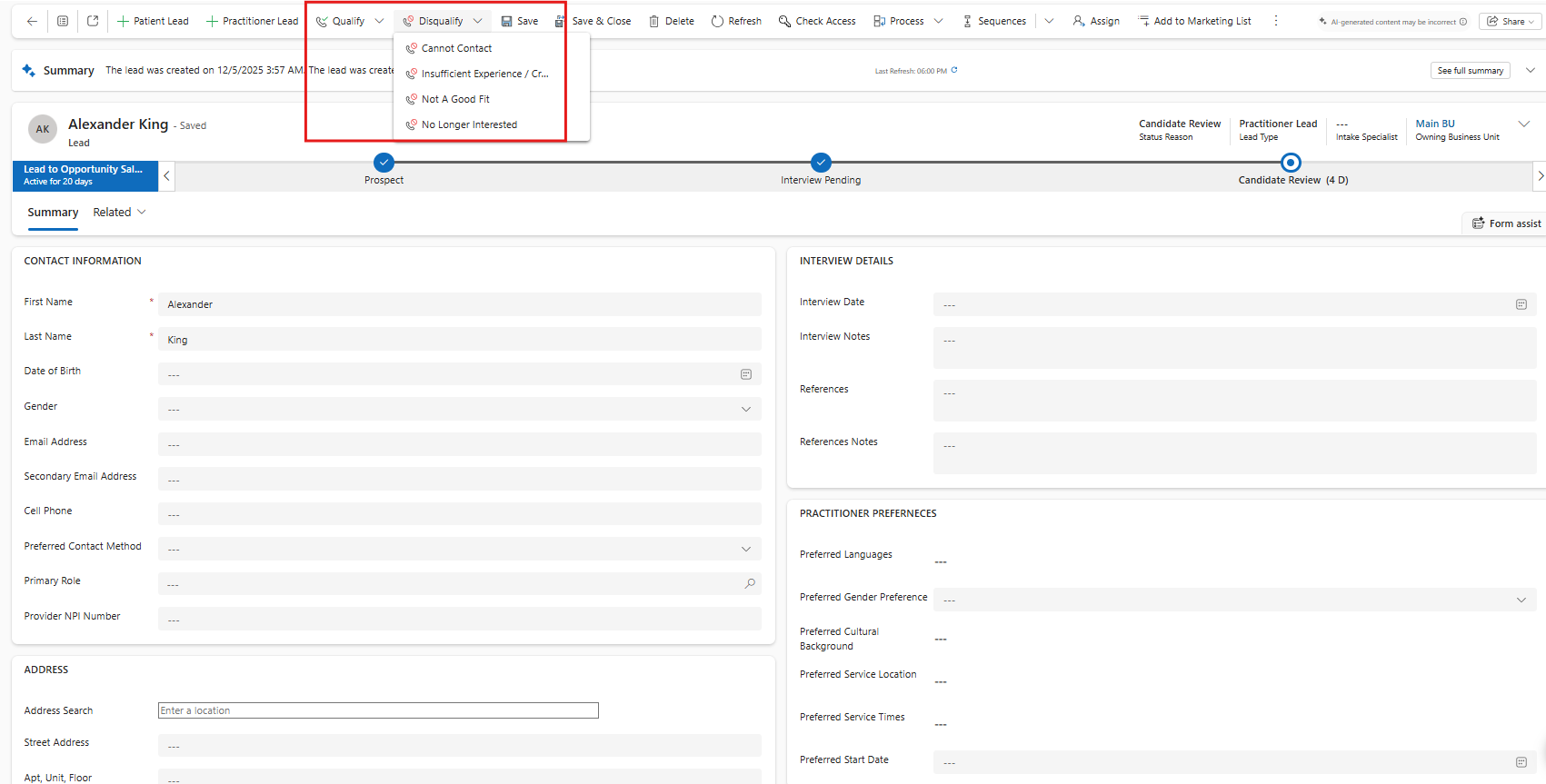
Practitioner Leads have 3 stages:
- Prospect
- Interview Pending
- Candidate Review
- A practitioner lead is created at the Prospect stage.
- Once an interview has been offered to the practitioner, enter the Interview Date and click 'Next Stage' to move the lead to the Interview Pending stage.
- Once the interview was completed, click 'Next Stage' to move the lead to the Candidate Review stage.
You can qualify the lead into an opportunity at any point once you have gathered the information you'd like to review (qualify to Candidate Review), or once you have reviewed the candidate and are ready to hire (qualify to Offer).
Disqualify the lead if the practitioner is not proceeding, and choose why they were disqualified.
Lead Views
Go to 'Leads' on the site menu in the CRM Area to open the Lead Main Grid and choose from available views:
- All Leads
- The All (Patient/Practitioner) Leads view displays all the leads in the system. This includes qualified, open, and disqualified leads.
- Open Leads
- The Open (Patient/Practitioner) Leads view displays patient/practitioner lead records that are not qualified/disqualified.
- My Open Leads
- The My Open (Patient/Practitioner) Leads view displays patient/practitioner lead records where the intake specialist is the user viewing the records.
- Qualified Leads
- The Qualified (Patient/Practitioner) Leads view displays patient/practitioner lead records that were qualified to opportunities.
- Disqualified Leads
- The Disqualified (Patient/Practitioner) Leads view displays patient/practitioner lead records that were disqualified.
Pair a view with a chart to visualize your data and measure improvement over time. Click 'Show Chart' and choose from:
- Leads Per Week, Month, or Quarter
- Leads By Status Reason or Lead Type
- Leads By Intake Specialist, Marketer, Marketing Source, Referral Account, or Business Unit
- Leads By Lead Type per month
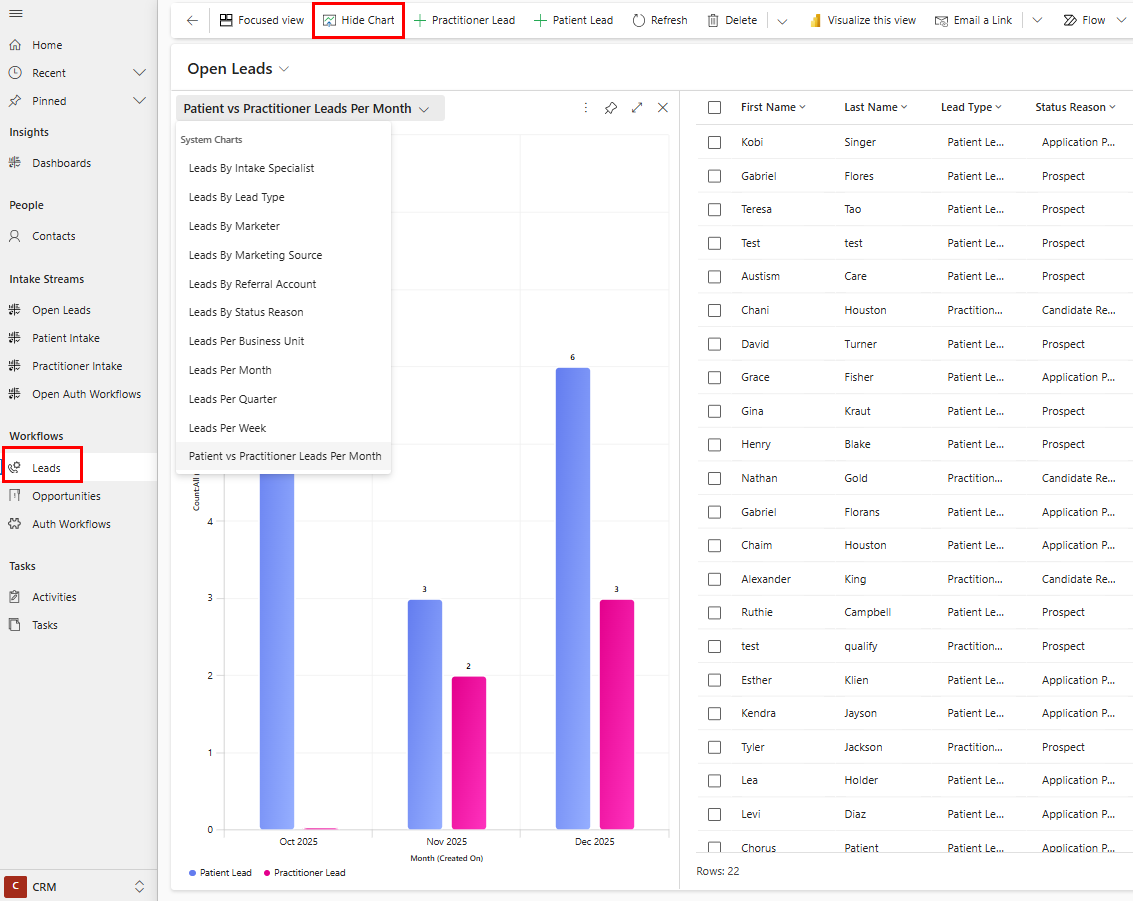
Open Leads Intake Stream
Use the Open Leads Intake Stream to efficiently work through open patient or practitioner leads. Filter by any visual on the dashboard to filter your stream and allow you to take next steps on open records easily:
- Lead type (patient/practitioner)
- Lead status reason
- Week the lead was created
- Intake specialist
- Business unit
You can also jump to your open tasks or phone calls from the tiles on the right side of the dashboard.
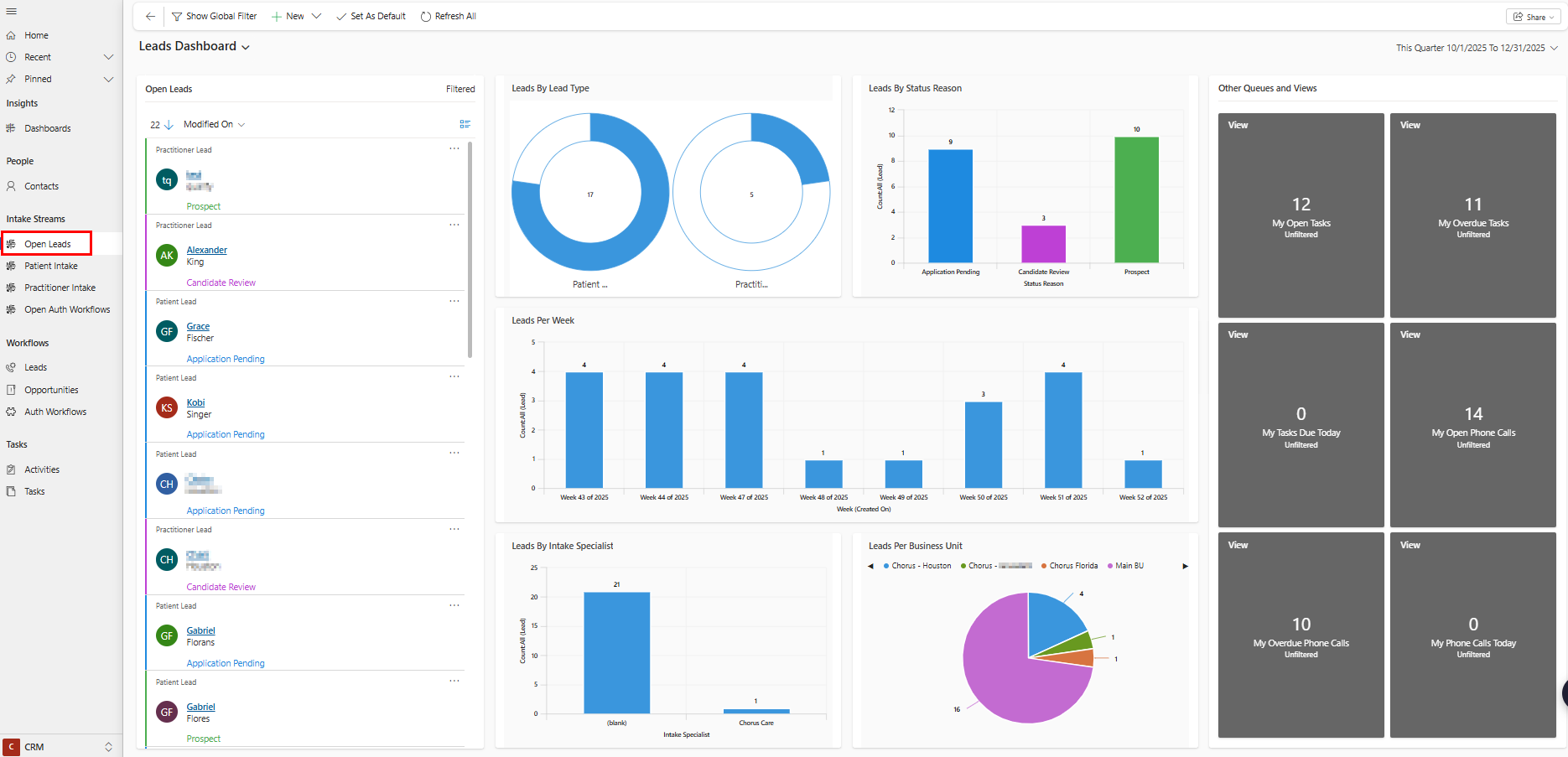
The filter at the top right of the report can be ignored- at any time, all open leads will show regardless of when they were created.